
Before buying a used car, in many countries you ask for a Carfax: a report with the vehicle's history and risks. A home costs a hundred times more and almost nobody asks for its equivalent. Hogarfax's property report PDF is exactly that: the Carfax for homes and properties in Spain. Here is a real example, explained page by page, so you can see exactly what it contains before generating your own.
The PDF we analyse is Hogarfax's public example report: a real property in Torrelodones (Madrid), with the cadastral reference anonymised. It is 11 pages gathering more than 20 official checks on history, price, risks, land, surroundings and condition, closing with a block that turns every finding into a concrete recommendation. You can download the whole thing and follow along with the document in front of you.
Download the example property report (PDF)
The same document we explain here, in PDF and for free. See the full professional format before analysing your own property.
Download example PDFPage 1 — Property identity, location and summary
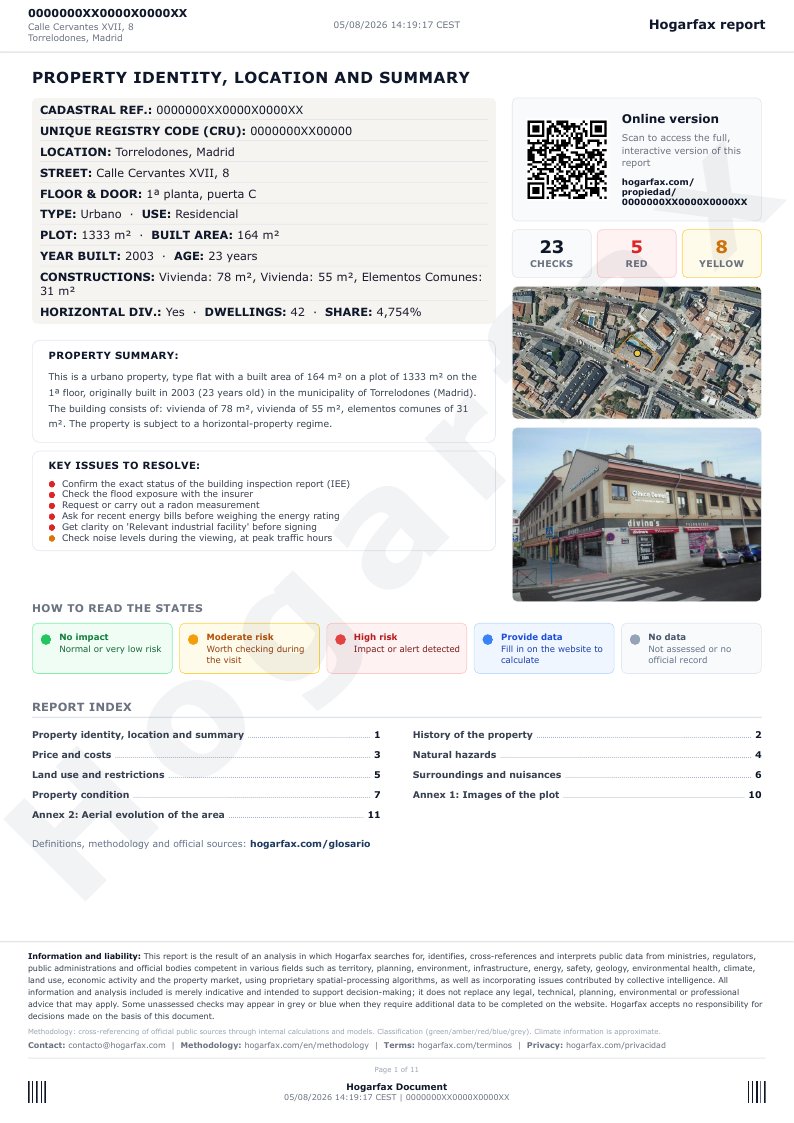
The first page is the property's identity record: cadastral reference, unique registry code, location, address, floor and door, use and land type, plot and built area, year of construction and age, and the breakdown of constructions. If the property is under horizontal division (a multi-unit building), it also shows the number of dwellings in the building and the ownership share (coeficiente de participación) recorded at the Cadastre. Top right, a check counter summarises the overall result: in this example, 23 checks, with 5 in red and 8 in amber.
Right below, the «Main issues to resolve» block turns the red and amber checks into a list of 3 to 6 concrete actions, ordered by how urgent or decisive they are for the purchase decision. The page is completed by a written property summary, the facade photo and an aerial view, a QR code that opens the interactive online version, the legend for the five possible states (no issue detected, moderate risk, elevated risk, add data, and not enough data) and the report's full table of contents.
Page 2 — History of the property
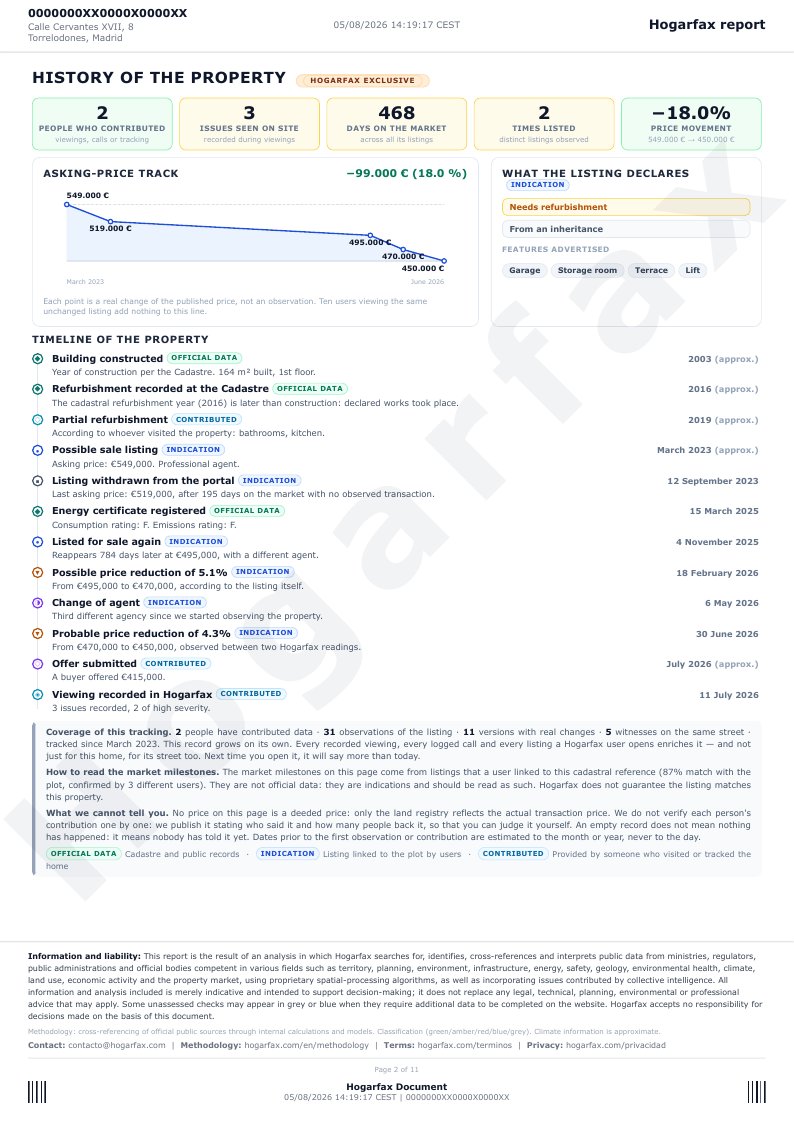
This page is exclusive to Hogarfax: nobody else reconstructs a property's history from its own listings and from what people contribute. Four headline figures — people who contributed data, on-site incidents logged, total days on the market and how many times it has been listed — followed by the asking price trail: a chart with every real price change, not every time someone saw the same unchanged listing.
Below, the property's full timeline: construction, renovations declared at the Cadastre, listings and de-listings, the registered energy certificate, changes of agent, price cuts and, where reported, issues observed by other users during a viewing. Each milestone carries its origin tag — official record, indication or contributed — so you know whether it is a public record, something inferred from listings, or something a person reported.
Page 3 — Price and costs
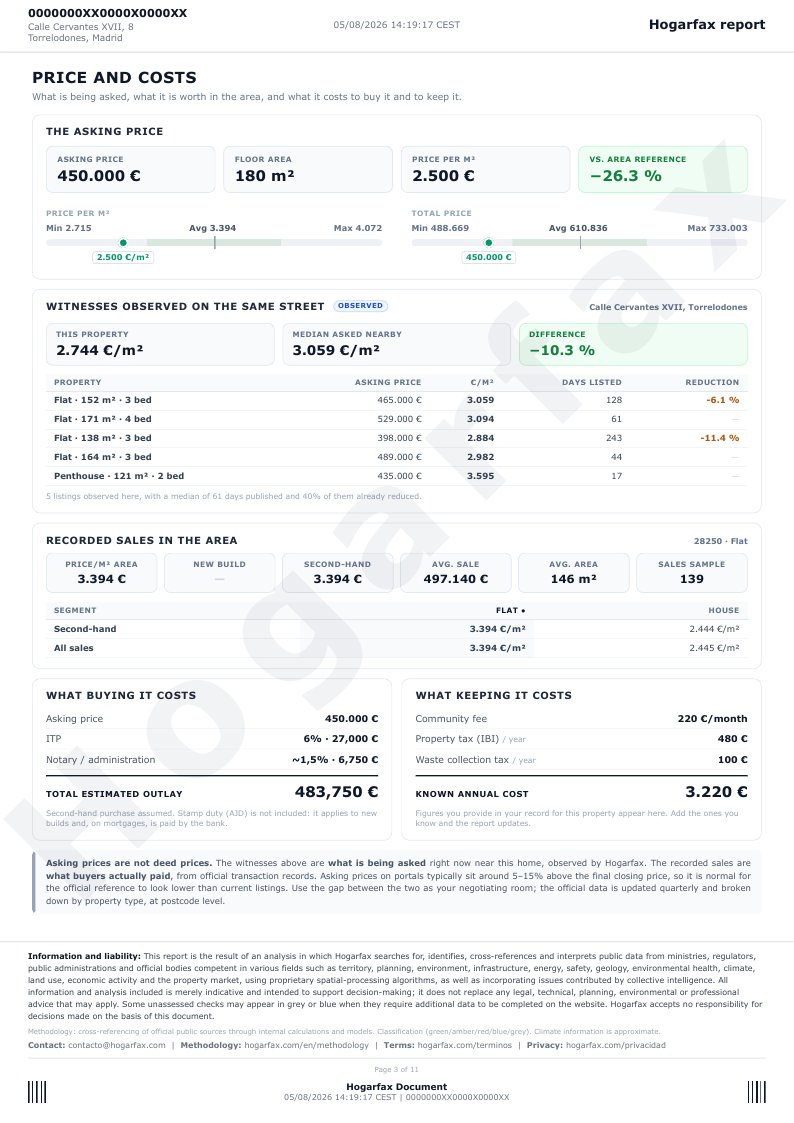
This page answers an uncomfortable question: is the price fair? It first places the asking price and the €/m² within the area's minimum–average–maximum range. Then the new part: witnesses observed on the same street, other real listings Hogarfax has seen in the immediate surroundings, with their price, size, days listed and any price cuts. It is not a postcode-level statistic — it is what is being asked right now, a few metres from this property.
Below that, registered sales in the area — official records of what people actually paid, not listing prices — and, to close, two very concrete tables: what it costs to buy it (transfer tax, notary, agency fees, estimated total outlay) and what it costs to hold it (service charge, property tax, waste fee). The report is explicit about the gap between the asking price and the deed price, so you don't confuse what is being asked with what is actually paid.
Page 4 — Natural hazards
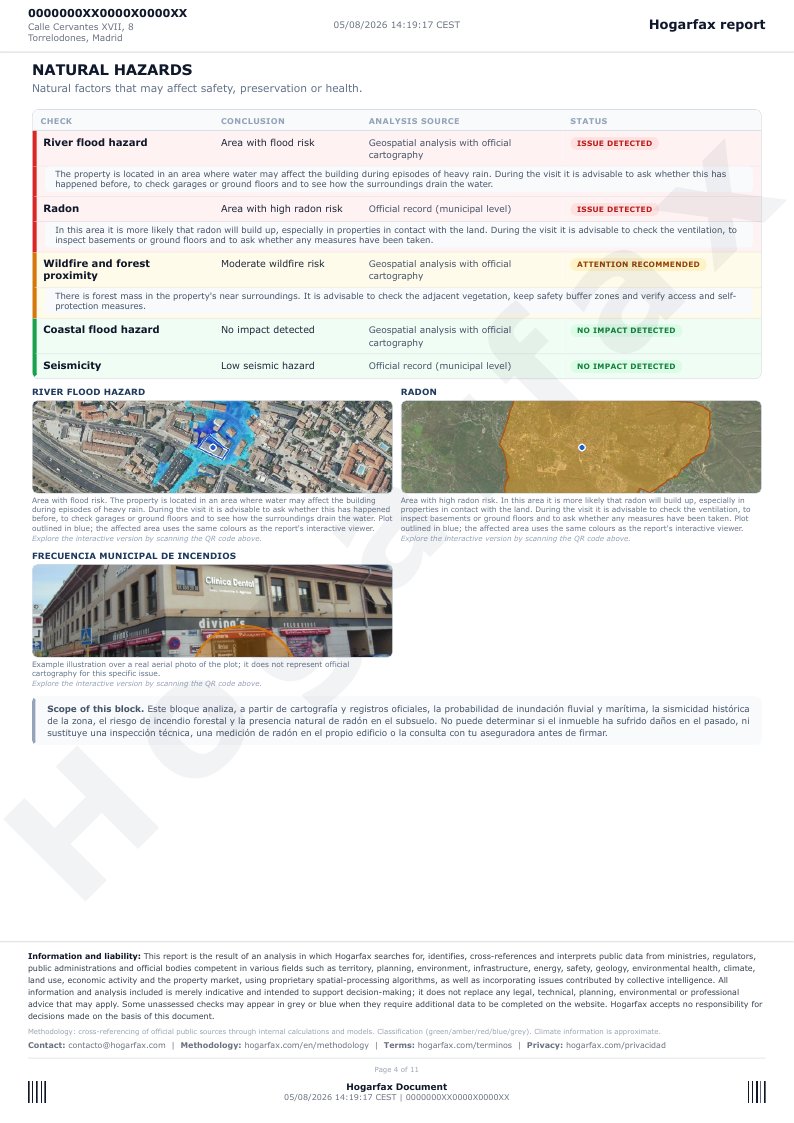
Here are the natural risks that can affect safety, the building's condition or people's health: river flood hazard, coastal flood hazard, radon, seismic hazard and wildfires and forest mass. In this example, river flood hazard and radon come back with an issue detected, and the report says it plainly, with the right nuance: «flood-risk zone», not «this property floods».
Each row states its analysis origin — official record, cross-referenced official sources, or geospatial analysis with official cartography (MITECO, Nuclear Safety Council, IGN, Forest Map of Spain) — and, when there is something to check, a short line right below with what to look at during the viewing. Risks flagged red or amber also carry their own image, with the issue drawn over a real aerial photo of the plot.
Page 5 — Land limitations and uses
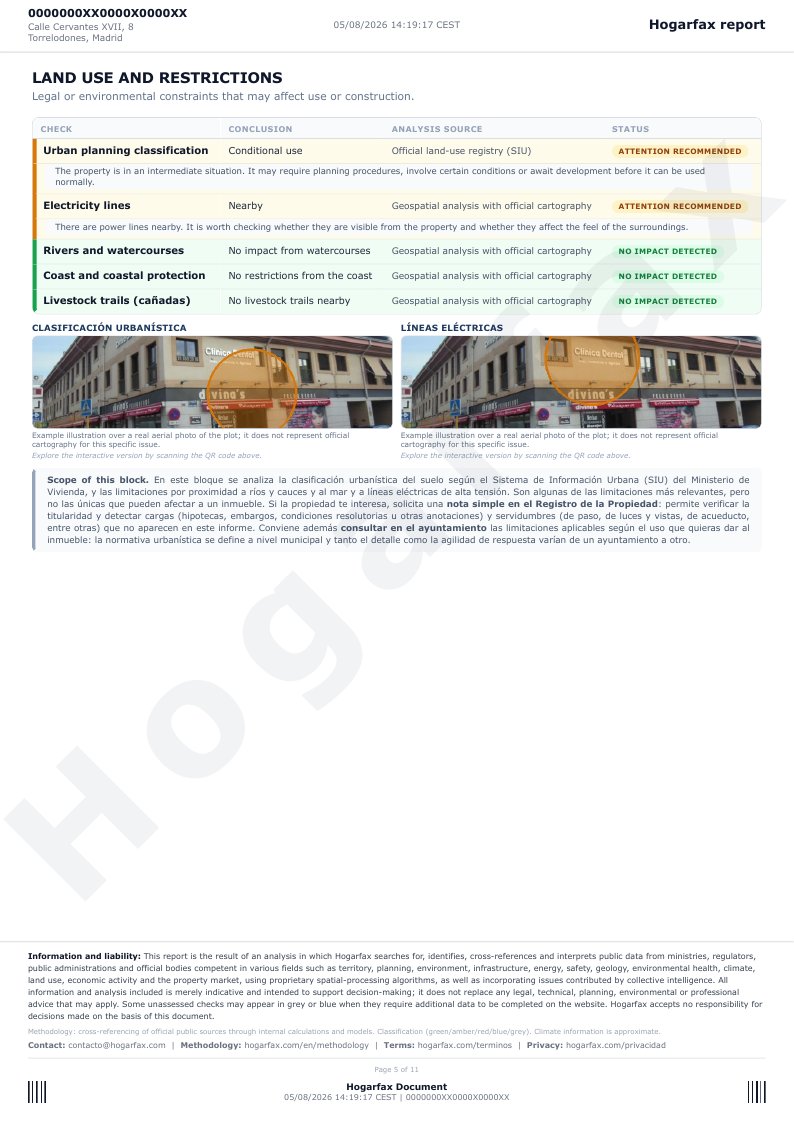
This page analyses the legal and protection constraints on the plot: the land's urban classification per the Urban Information System, easements from proximity to rivers and watercourses and to the coast, proximity to high-voltage power lines, and the presence of livestock trails. They determine whether you can renovate, extend, or whether there are building restrictions — in this example, urban classification and power lines come back amber.
The report is honest about its limits: the block's own scope note reminds you that some charges (mortgages, seizures, rights of way) only appear in the Land Registry extract (nota simple), and that the fine urban-planning detail is confirmed at the town hall. The report tells you where to look; you take those two steps if the property genuinely interests you.
Page 6 — Surroundings and nuisances
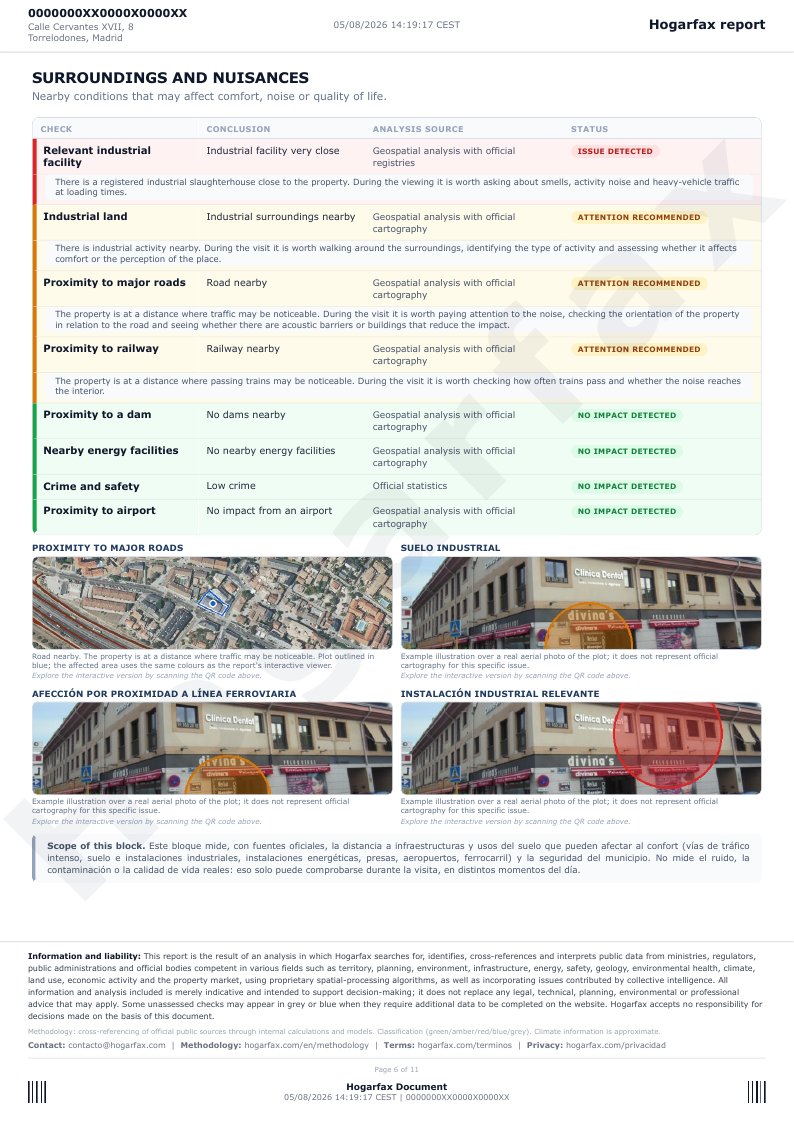
The surroundings shape quality of life as much as the property itself. This page measures proximity to industrial land and to relevant industrial facilities, to energy facilities, to dams, to busy roads, to airports and to railway lines, plus the municipality's crime compared with the national average.
In the example there is a relevant industrial facility very close by, plus industrial land, proximity to major roads and a railway-line issue worth checking: each one carries its own image, with the issue drawn over the plot's real aerial photo, so it reads on the ground and not as an abstract label. The scope note is clear: this block measures distances using official sources, not actual noise or quality of life — that can only be checked during the viewing, at different times of day.
Page 7 — Property condition
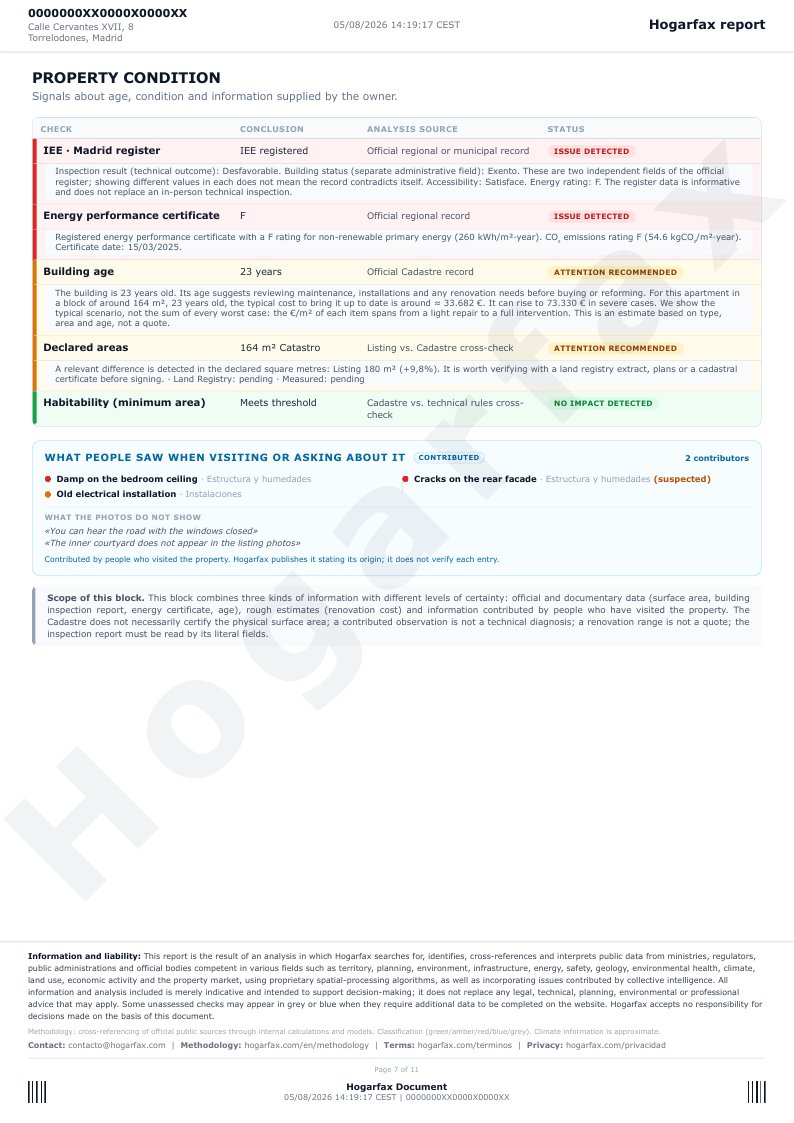
This page examines the property's physical and legal condition: the result of the technical building inspection (IEE), the energy certificate with its rating and date, the age with a ballpark renovation-cost range, the declared areas — here the report detects a relevant gap between the listing's square metres and the Cadastre's, worth verifying before signing — and habitability by minimum surface.
It closes with «What visitors or enquirers observed»: issues contributed by other people — damp, cracks, old installations — clearly separated from what doesn't show in the listing photos, with a reminder that a contributed observation is not a technical diagnosis. It is the section that turns «this 2003 property» into «here is what you will probably need to check».
Pages 8 and 9 — Recommendations and questions
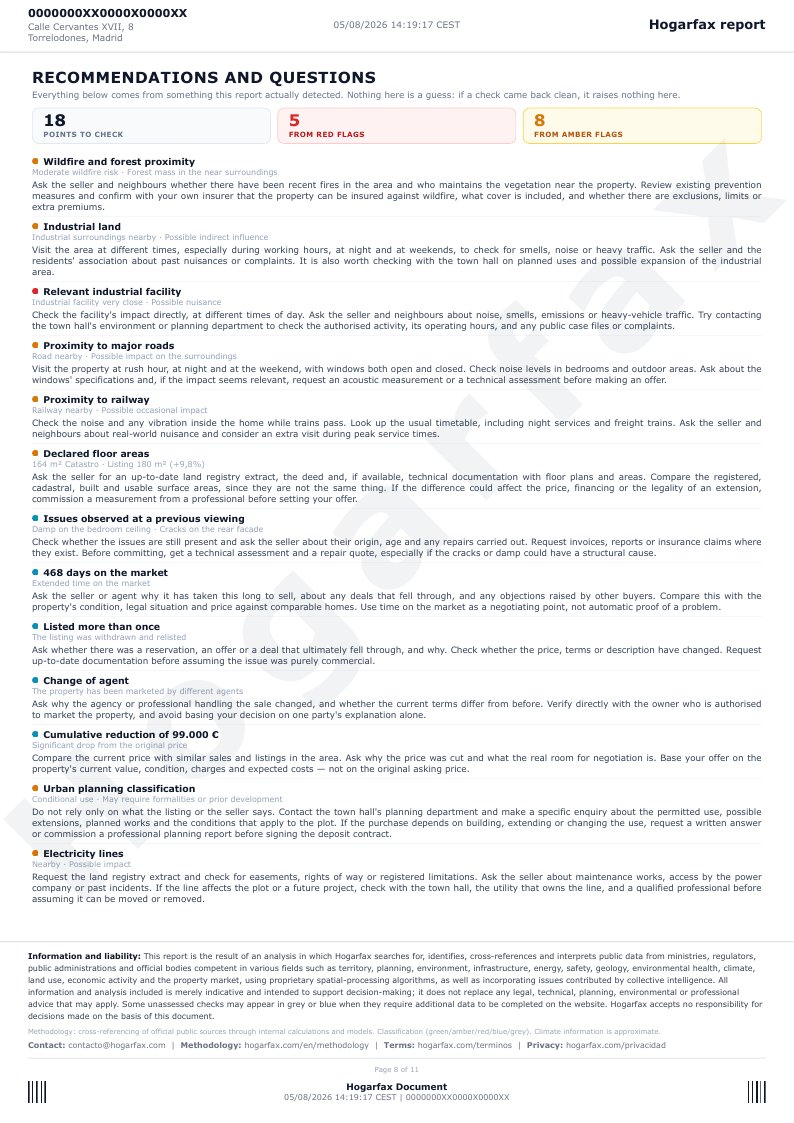
This is the page a buyer stands on in front of the seller. It gathers every red and amber signal from the whole report — risks, land, surroundings, condition, price — plus what the property's commercial history reveals, and turns them into a recommendation that combines, where relevant, several verification paths: asking the seller, checking with neighbours or the residents' association, consulting the competent authority, requesting a technical or documentary review, and confirming with your own insurer. None of this is invented: every recommendation comes from an actual finding in the report, never from a template.
In this example there are 18 points to check. The closing block explains the criteria used to combine the five paths, and states something important: the seller is one source among several, not the only one, and not responsible for certifying technical, planning or insurance matters.
Page 10 — Annex 1 · Images of the plot
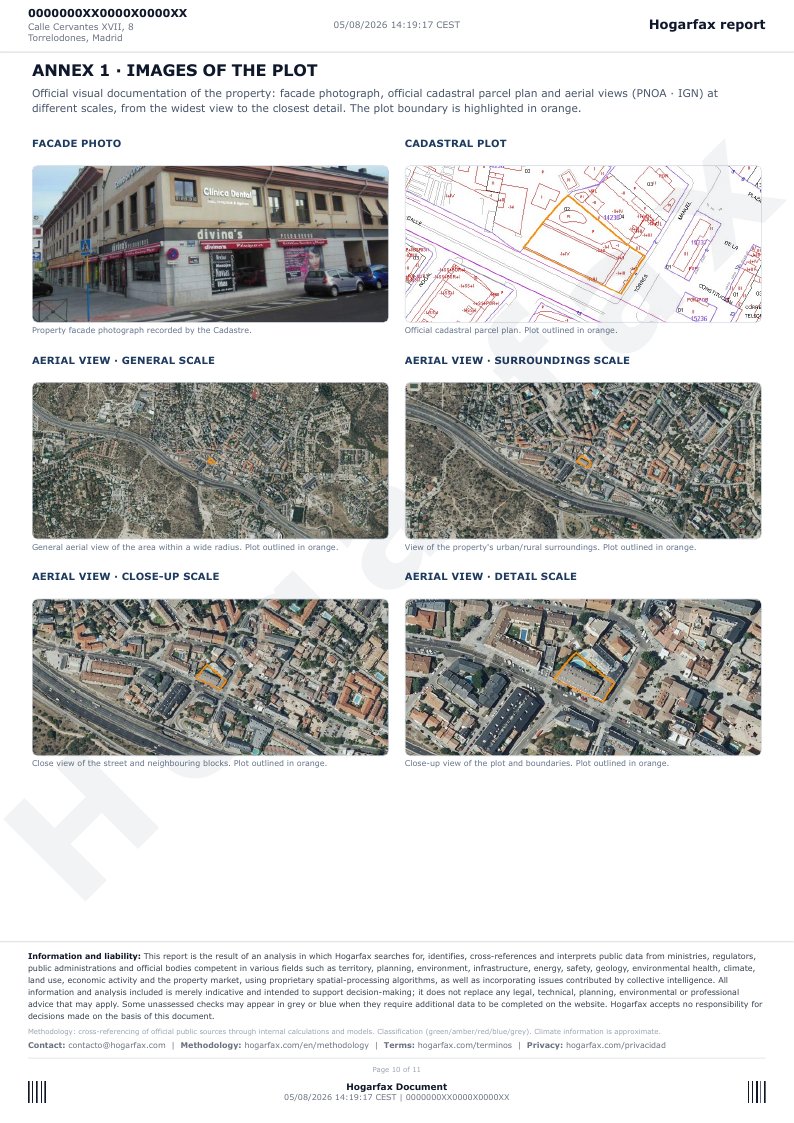
This annex gathers the property's official graphic documentation: the facade photo registered by the Cadastre, the official cadastral map with the plot highlighted in orange, and four aerial views (IGN's PNOA) at different scales — general, surroundings, approach and detail. It helps you locate the property, understand its plot and see what surrounds it without setting foot on the street.
Page 11 — Annex 2 · Aerial evolution of the area
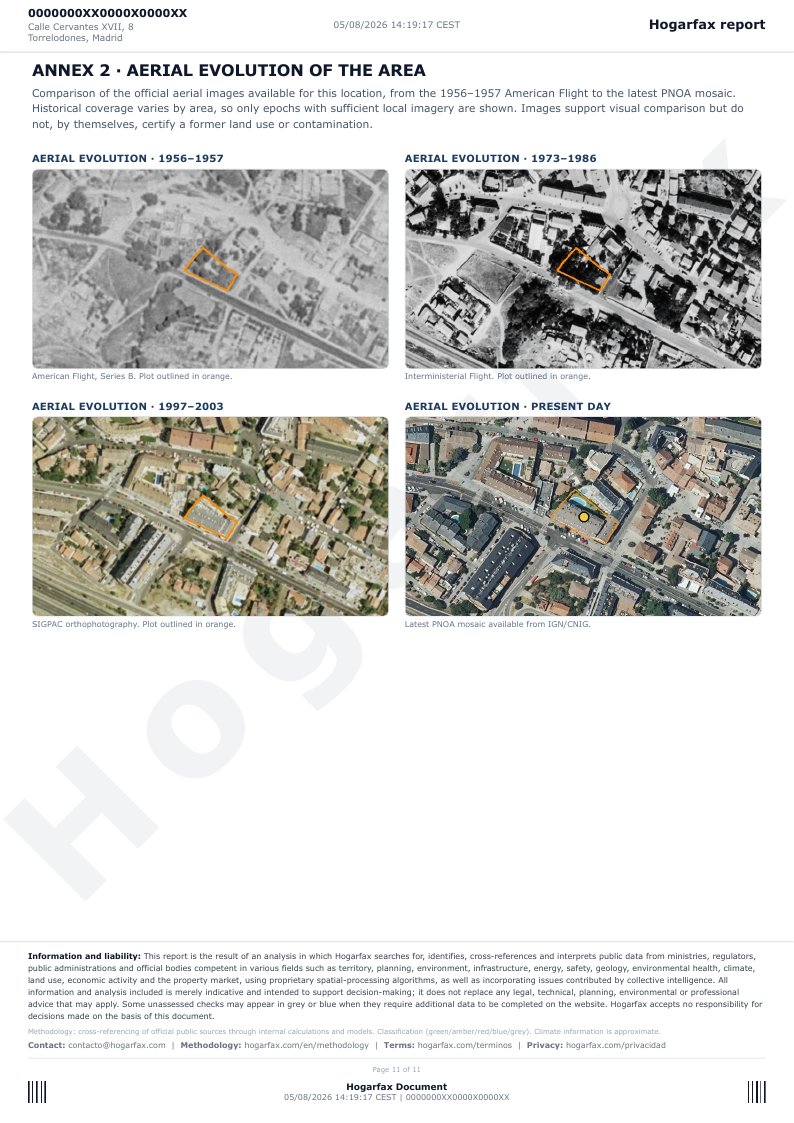
The last annex compares the plot's historical evolution using official aerial imagery from four different periods, from the 1956-1957 American Flight to the most recent PNOA mosaic. It lets you visually see how the surroundings have changed (or not) over the decades — whether it was farmland, whether it was developed, whether something disappeared — though the report itself notes that the images alone do not certify a prior land use or contamination.
Generate the PDF report for your property
Enter the address or the cadastral reference and get this same report for the property you are interested in. Free exploration; full report with PDF for 24.90 € (VAT included).
Generate my property reportWant to see each check in detail, with its source? It is all in what we analyze in every property. And if your question is about the specific risks, start by checking a property's risks or read what online property reports can really tell you.
Fuentes
Was this article useful?
Your answer helps us improve the blog and understand which guides deserve more depth.