You browse twenty Idealista listings a week and they all tell the same story: nice photos, square metres and a price. What none of them tells you is whether that price is real, whether the surface matches the Cadastre or whether the home is squatted. Hogarfax's new free Chrome extension answers those questions inside the listing itself, in seconds and with official data.
In this guide we cover exactly what the extension shows, how it locates the property in the Cadastre even when the listing hides the full address, and why it changes the way you screen listings before visiting or making an offer.
What the Hogarfax extension for Idealista is
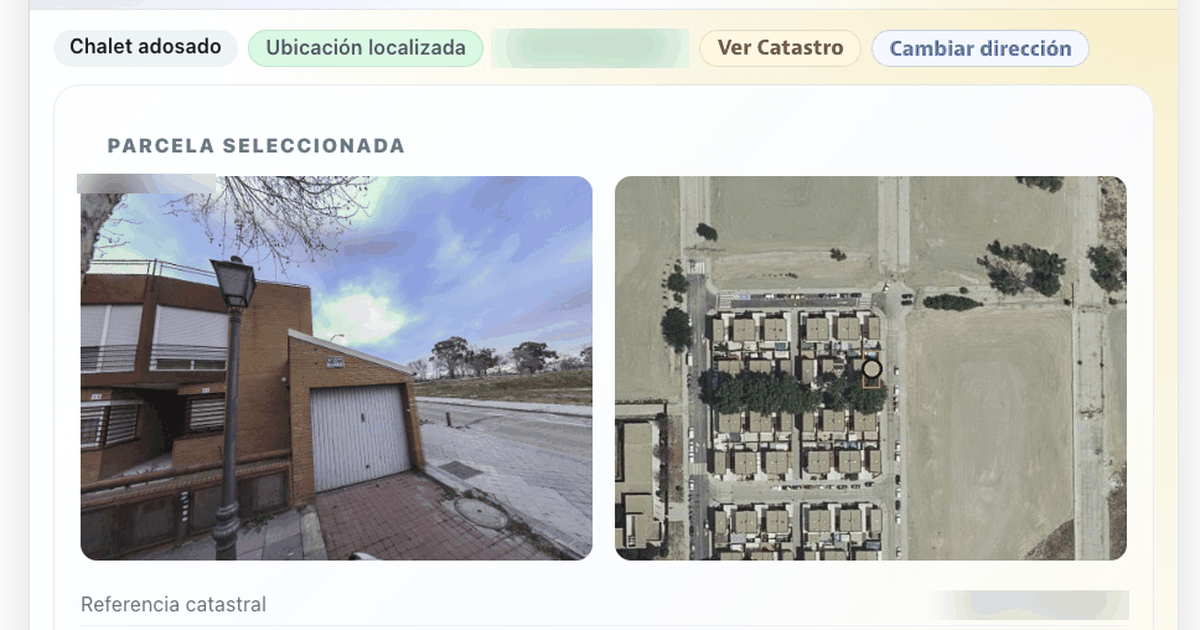
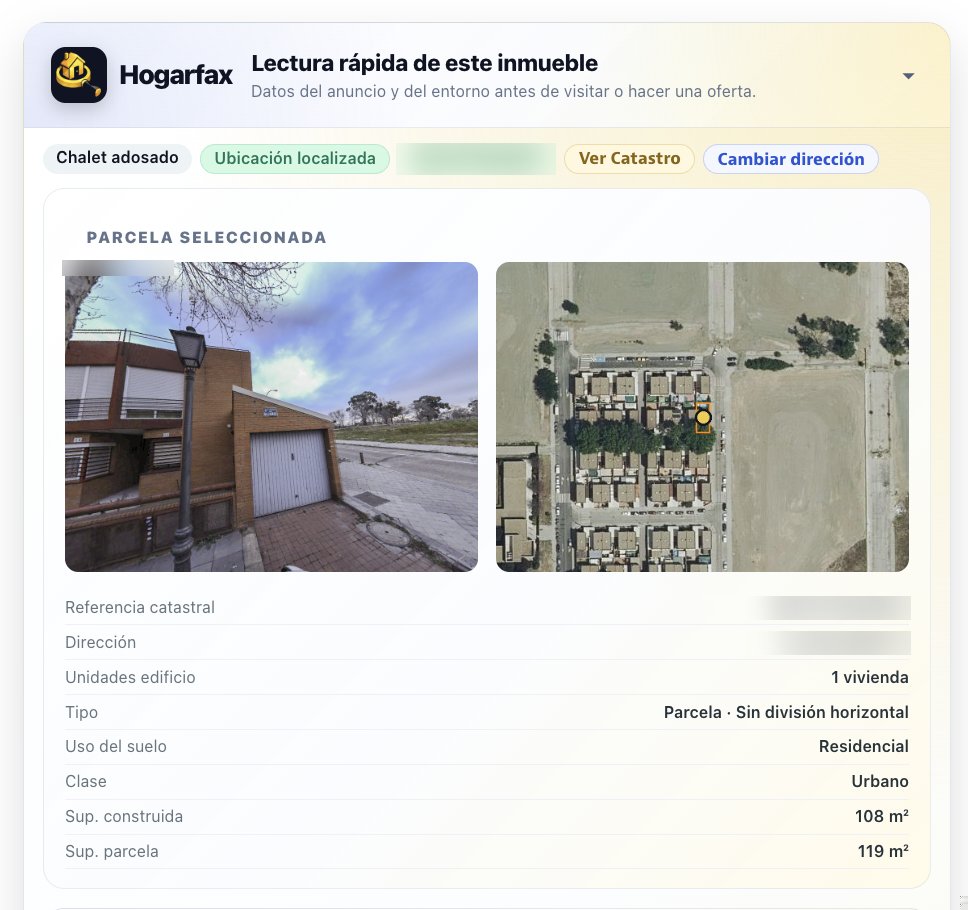
It is a free Chrome extension that activates only when you open a property listing on idealista.com. When the listing loads, it inserts a quick property reading panel with data the listing does not show: the asking price compared with real registered sales in the area, the official Cadastre record with facade photo and aerial view of the parcel, an estimated renovation cost, the full purchase costs and any warning signals detected in the listing text.
No account, no copying addresses by hand and no jumping to another tab: everything happens inside the listing you were already viewing.
What you see for free on every listing
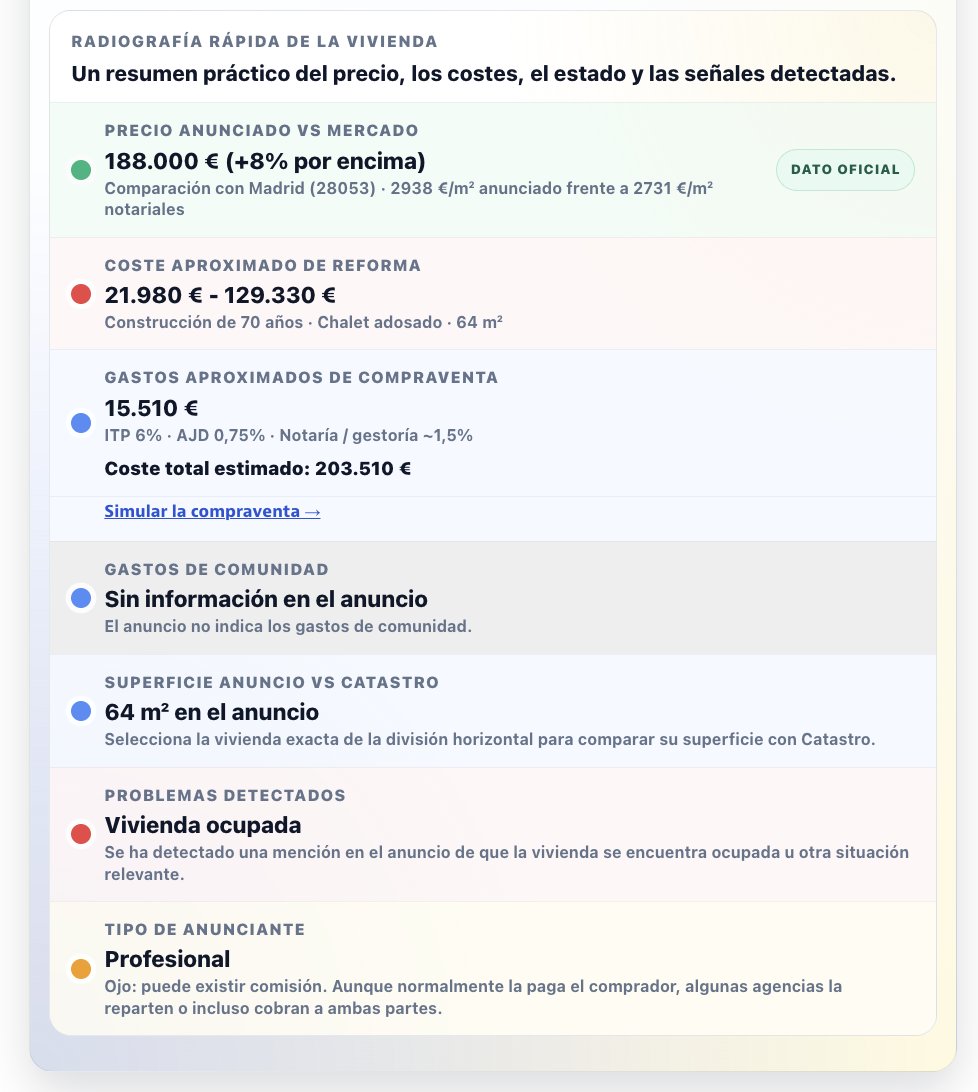
- Asking price vs. real market: we compare the listing's €/m² with real registered sale prices in the area, not with other listings. A home “40% below market” is almost never a bargain: it is a signal to investigate.
- Cadastre record: cadastral reference, official address, land use, class, built and plot surfaces, and building units.
- Facade photo and aerial view of the parcel, straight from the Cadastre.
- Estimated renovation cost based on the real construction year, not the one in the listing.
- Purchase costs: transfer tax (ITP), stamp duty (AJD), notary and processing fees, with the estimated total cost of the operation.
- Listing surface vs. Cadastre: if the square metres do not add up, you will see it before visiting.
- Detected issues: mentions of squatted property, auction, bare ownership or an ongoing rental in the listing text.
- Advertiser type (private or professional) and a heads-up about possible agency fees.
- Municipal safety with the official crime statistics of the Ministry of the Interior.
How it locates the exact home (even when the listing hides the address)
This is where it differs from any other tool: the extension uses the same address-resolution and Cadastre engine as Hogarfax itself. If the listing publishes street and number, it locates the parcel automatically and verifies the official data. And if it does not:
- The listing shows the street but not the number: the extension fixes the street and only asks for the number. One click and done.
- The listing only shows the area: the full official address search opens so you can enter street and number.
- Building with several homes: a floor, staircase and door selector lets you pin down the exact home in the listing.
As soon as the home is identified, Hogarfax quietly starts preparing the full report while you keep reading the listing. If you decide to buy it, it is already done.
From the free pre-report to the full report
The extension is free and will stay free: it is the quick-screening layer. When a home passes that first filter, the next step is the full Hogarfax report (24.90 € (VAT included), one-time payment, satisfaction guarantee): the complete territorial due diligence linked to the parcel, with over 25 official checks no listing will ever show.
- Natural hazards: river and coastal flooding with official cartography, radon, seismicity and wildfire risk with forest mass, recent fires and active fire detected by satellite.
- Land restrictions: planning classification, livestock trails and coastal or riverbed constraints.
- Surroundings: high-voltage power lines, industrial land, macro-farms and landfills, energy facilities, dams, noisy roads, airports and railways.
- The property itself: habitability by surface, ITE/IEE status, energy performance certificate and full cadastral record.
- Delivery: dynamic parcel viewer with every layer and a professional PDF report.
Privacy: what the extension does and does not do
- It only activates on idealista.com property listings; on the rest of the web it does nothing.
- It does not read your Idealista account, messages or forms, nor your browsing history.
- It does not store listings or track you: it sends hogarfax.com only the fields needed to compute the pre-report, and the full extracted data only if you decide to continue in Hogarfax.
- Hogarfax is not affiliated with Idealista: it is an independent analysis tool for buyers.
How to get started
The extension is free on the Chrome Web Store. The extension page has screenshots, FAQs and a one-click button to add it to Chrome.
Add the extension to Chrome
Install it for free from the Chrome Web Store and you will see the pre-report inside every Idealista listing.
See the extensionFuentes
www.interior.gob.es/opencms/es/prensa/balances-e-informes/
Was this article useful?
Your answer helps us improve the blog and understand which guides deserve more depth.